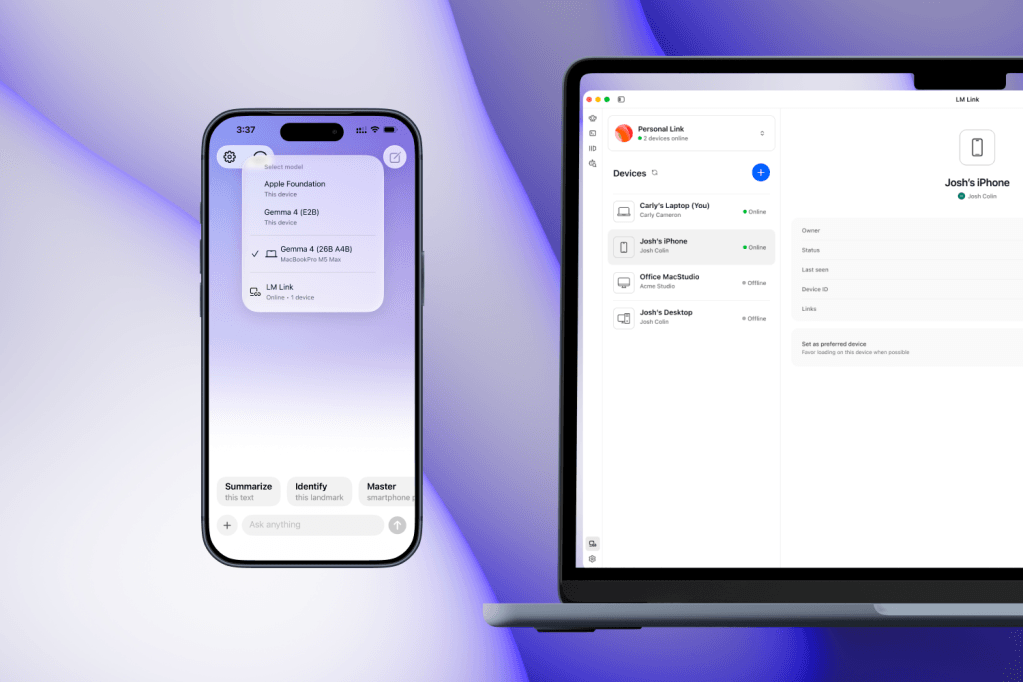
LM Studio updated its Mac app and the Locally AI iOS app with LM Link, a feature that lets you control local LLMs running on your Mac from your iPhone. The connection uses end-to-end encryption over Tailscale mesh VPN, keeping your data off public servers.
LM Link gives Mac owners with local AI models a way to continue workflows on the go. You can send queries from your phone while the heavy lifting stays on your computer. The feature is free during a preview period before paid plans launch.
How the encrypted connection works
LM Studio requires you to sign in with an account on both devices. Once activated, the encrypted tunnel keeps communication private between your Mac and iPhone. Your devices never expose traffic to the public internet.
The integration relies on Tailscale mesh VPN primitives. LM Studio says
"LM Link is an entirely separate and self-contained use of Tailscale VPN primitives."
Existing Tailscale setups remain unaffected if you use the service elsewhere.
Model support and performance
LM Link works with any model you have installed on your Mac, including the Apple Intelligence foundation model. Your performance will depend on your Mac's hardware, just as it does when running models directly on the computer.
Pricing and preview status
LM Studio offers LM Link for free during the Preview period. Paid plans will launch afterward. The company has not yet disclosed pricing details for those tiers.
Testing results and known issues
Independent testing over several days confirms the feature works for mobile continuity. You might experience connection drops when the iOS app enters the background—for instance, if you switch apps or perform other tasks before returning to the chat. Developers say this results from how the secure connection establishes and are working to reduce reconnection latency.
What to do now
The update rolled out today. Google also released a 12-billion-parameter version of Gemma 4 designed for Macs with 16GB of memory or more, expanding options for local model users on capable hardware.
You should test LM Link during the free preview to evaluate whether mobile connectivity fits your workflow before paid plans launch.