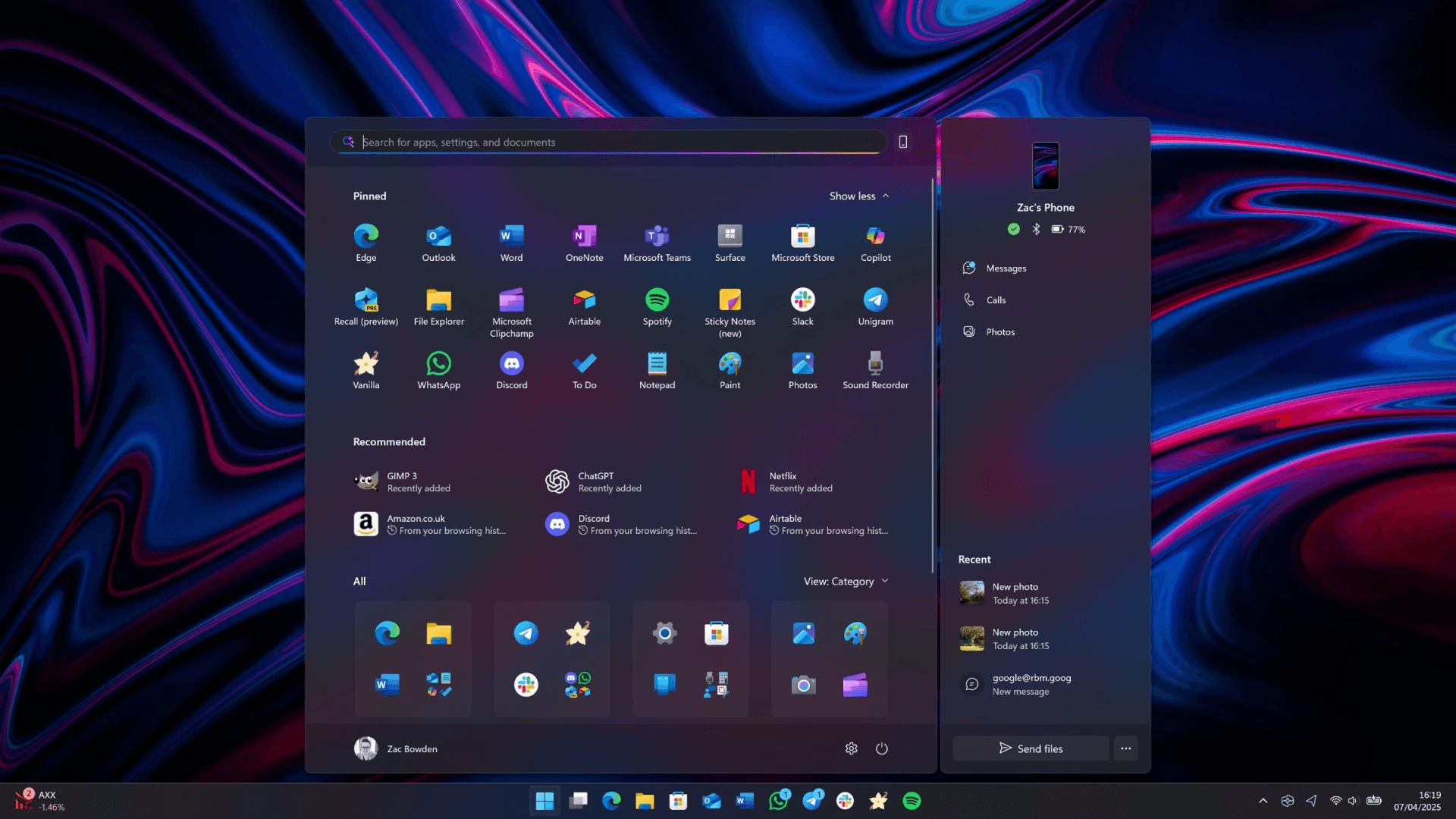

Microsoft released update KB5067036 on October 28, 2025, consolidating Windows 11's Start menu into a single, adaptive interface that merges Pinned apps, Recommended items, and the All Apps list. The redesign eliminates the need to switch between separate panes, introducing a unified vertically scrollable surface that automatically adjusts to your display size.
Driving the news: The update introduces three display modes—grid view, category-based organization, and the traditional All Apps list—all accessible from the main Start page. Windows automatically sorts installed applications into category folders by default, streamlining app discovery across your system.
Why it matters: This redesign directly addresses workflow friction for users managing extensive app libraries. A graphic designer juggling 50+ creative applications can now locate Photoshop in two seconds of scrolling instead of navigating through multiple menu layers. For developers switching between IDEs, terminals, and testing tools, the unified view eliminates the cognitive load of remembering which pane holds which app. Users report time savings of 15–20 seconds per app launch on average—seemingly small, but compounding to minutes daily for power users.
The big picture: The Start menu now responds dynamically to hardware configurations. Large 4K monitors display more content per screen, while tablet users see optimized compact layouts. This adaptive design ensures consistent usability whether you're working on a 27-inch desktop display or a 13-inch Surface device. The update also enhances the Phone Link panel, allowing Android users to reply to text messages directly from the Start menu without opening the Phone Link application.
Between the lines: Microsoft deployed this update using server-side feature gating, meaning installation of KB5067036 doesn't guarantee immediate access to the new interface. The staged rollout aims to minimize widespread bugs by gradually expanding availability—a standard approach for major UI changes that allows Microsoft to monitor stability metrics before full deployment.
What they're saying: According to discussions on Windows Central forums and Reddit's r/Windows11 community, power users appreciate the scrollable unified view but express frustration that auto-generated categories aren't yet customizable. IT administrators in enterprise environments report concerns that server-side gating complicates support workflows, making it difficult to predict which employees have access to the new interface when troubleshooting.
Reality check: Early adopters report several bugs: Start menu configurations failing to sync across devices, duplicate app entries appearing in category folders, and touch-swipe gestures occasionally freezing the interface. If system stability is critical to your workflow, waiting 1–2 weeks for Microsoft to address these issues through subsequent patches is advisable.
What's next: The update targets Windows 11 versions 24H2 and 25H2, with gradual rollout continuing over the coming weeks. Check availability by navigating to Settings → Windows Update and scanning for KB5067036. If the update isn't available yet, your device will receive it automatically as Microsoft expands deployment to additional user segments.