
• My Feed
  • Home
  • What's Important
  • Media & Entertainment
Search

Stay Curious. Stay Wanture.

© 2026 Wanture. All rights reserved.

  • Terms of Use
  • Privacy Policy
Tech/Gadgets
ASUS Zenbook A14 Review: 2.18 Pounds That Change Everything

Snapdragon X Elite, 32GB RAM, OLED—and the ARM compatibility question no one's answering

3 January 2026

—

Review *

Logan Price
banner

Three hours with the lightest Windows laptop you can buy. The $1,100 Zenbook A14 delivers OLED brilliance, full ports, and all-day battery in a 2.18-pound chassis. But Windows on ARM means app compatibility risks ASUS barely mentioned. We tested the keyboard, tracked the battery claims, and asked the hard questions about who should buy it now—and who should wait.

image-154

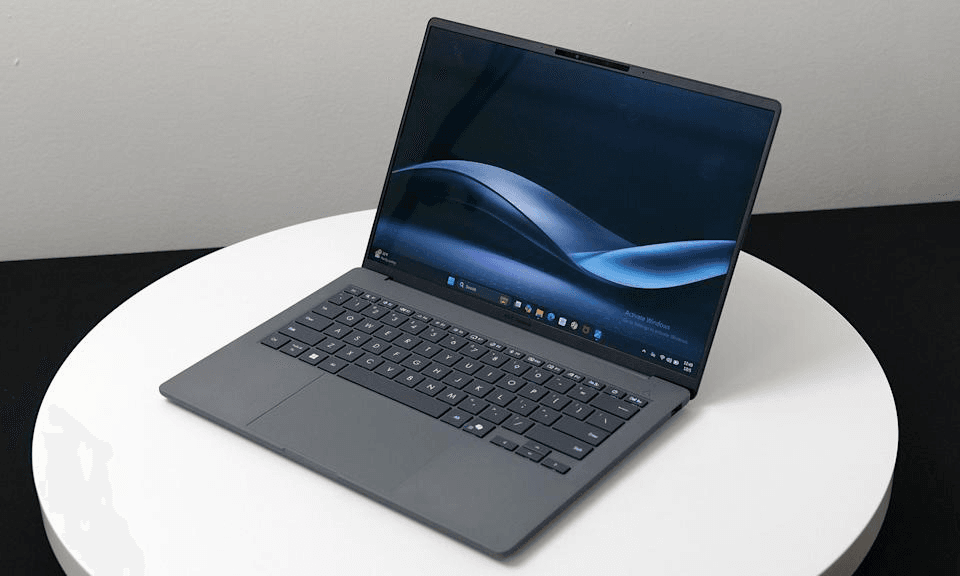
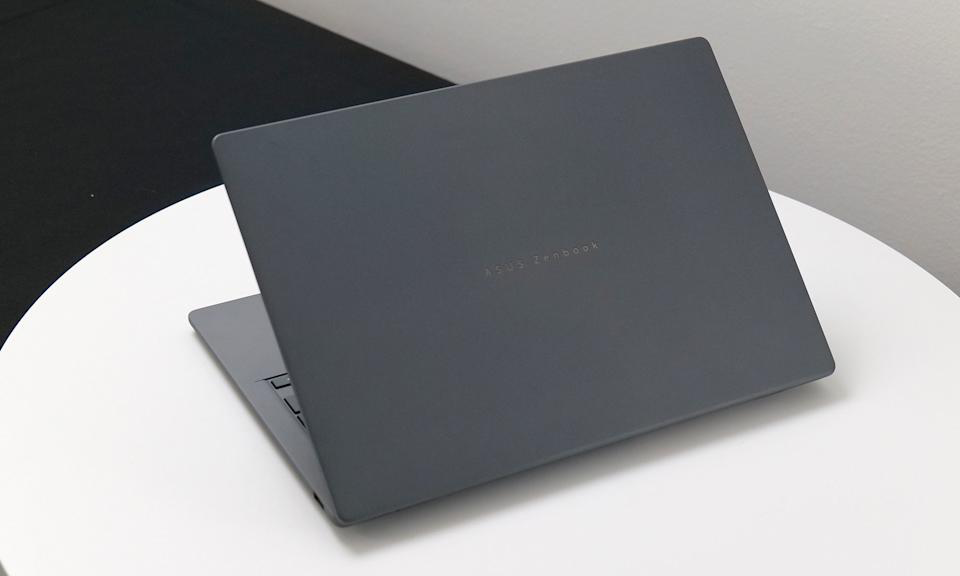
Three hours at CES 2025, and I kept coming back to one thing: lifting this laptop felt wrong. Too light. Like holding a magazine instead of a computer that costs $1,100 and packs 32GB of RAM. An ASUS product manager demonstrated by threading thumb and index finger through the chassis gap—holding the entire Zenbook A14 suspended for thirty seconds without strain. At 0.99 kg (2.18 pounds), it's the lightest 14-inch Windows laptop you can buy right now, and that changes the math on what "portable" actually means.
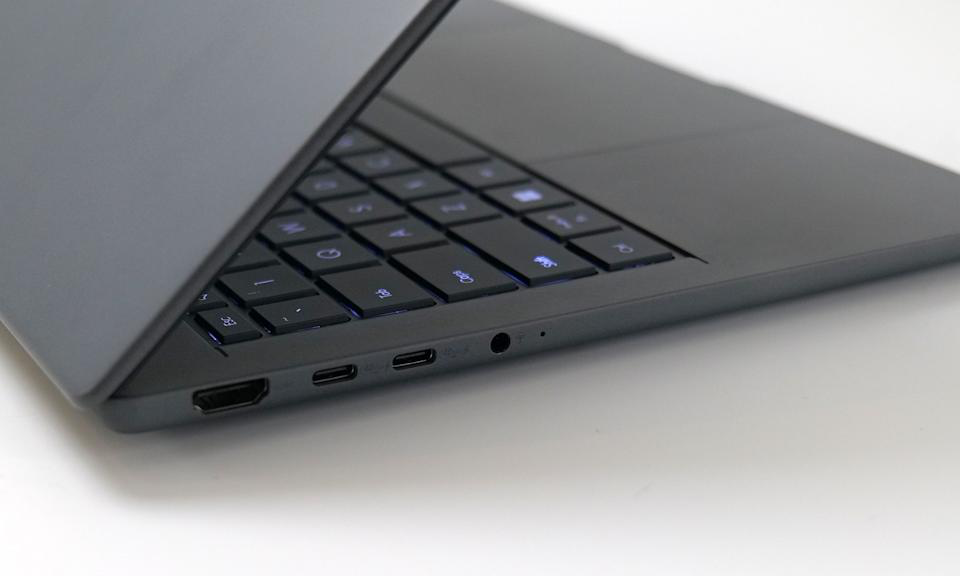
We tested the Snapdragon X Elite configuration—32GB RAM, 14-inch OLED display, Ceraluminum chassis—during a Tuesday morning demo session. The $900 base model with Snapdragon X Plus and slightly heavier frame waits for its own evaluation once we can test it properly beyond a show floor. This is about the premium configuration, the one that ships to all 50 states via ASUS store and Best Buy starting March 2025, and whether its portability and display justify the ARM compatibility trade-offs for your specific workflow.

What Works, What Doesn't, Who It's For

The Zenbook A14 excels at disappearing in your bag while delivering an OLED screen that outshines most laptops twice its price. It includes the ports—HDMI, USB-A, dual USB-C—that match how you actually work instead of forcing dongles into your daily routine. At $1,100, it undercuts MacBook Air by $99 and includes ports Apple makes you buy separately for $80-plus in adapters.
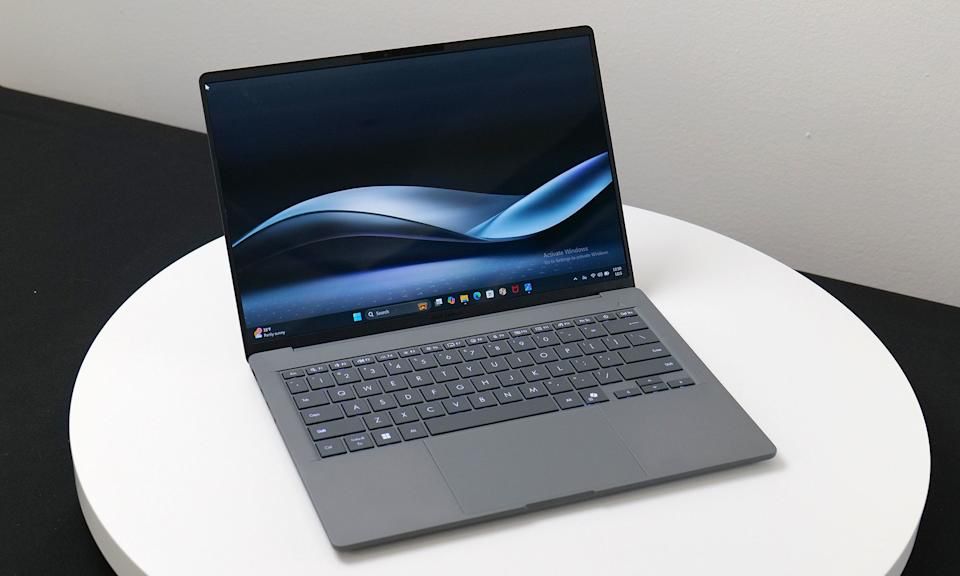
The biggest limitation arrives with Windows on ARM architecture. Some software won't run at all. Some runs slower through emulation. ASUS mentioned this once during the demo—"most popular apps work"—without specifying which ones don't or how much performance you lose. That vagueness matters when your paycheck depends on specific tools running reliably.

This laptop fits professionals whose workflows center on web apps, Microsoft 365, Slack, Zoom, and other mainstream tools that run natively on ARM. It's built for anyone prioritizing portability for daily commutes—think TSA checkpoints at O'Hare or coffee shops in Austin—over maximum compatibility with specialized software. If you're a UX designer working primarily in Figma and Google Suite, this could be your next machine. If you're a developer relying on legacy Docker configurations or industry-specific CAD software, verify ARM compatibility before spending a dollar.

The First Time You Pull It Out One-Handed While Holding Coffee

MacBook Air 13-inch: 1.22 kg (2.7 pounds). Most 14-inch Windows laptops: 1.27 to 1.45 kg (2.8 to 3.2 pounds). The Zenbook A14 undercuts them all at 0.99 kg (2.18 pounds)—enough to feel immediately different the first time you swing your bag onto your shoulder for a day of back-to-back meetings across Manhattan or a cross-country flight from Seattle to Miami.

ASUS used Snapdragon's power efficiency to strip away the thermal mass Intel chips demand, then wrapped everything in Ceraluminum—a ceramic-aluminum composite that's lighter and more rigid than standard aluminum. The surface feels slightly warmer to the touch than bare metal, almost like touching smooth stone that's been sitting in mild sunlight. Less heat-sinking means it stays comfortable when the laptop rests on your lap during long work sessions in airport lounges.

Thursday afternoon, same demo area at CES. A photographer from Portland plugged an SD card reader into the USB-A port, connected an external monitor via HDMI, charged through USB-C—all simultaneously, no adapters cluttering the table. The look on his face said everything about why built-in ports matter when you're working client sites and conference rooms where you can't afford fumbling for the right dongle while everyone waits.

The Colors That Make You Stop Mid-Scroll

The 14-inch OLED panel delivers 2880 × 1800 resolution at 243 PPI with 16:10 aspect ratio. ASUS claims 100% DCI-P3 color gamut and 400 nits peak brightness. We didn't have a colorimeter on the show floor, but side-by-side against a MacBook Air's LCD, the difference stopped conversations—deeper blacks, richer saturation, better contrast viewing design mockups and video. Colors felt more alive, like the difference between looking at a photograph in a magazine versus seeing the original print.
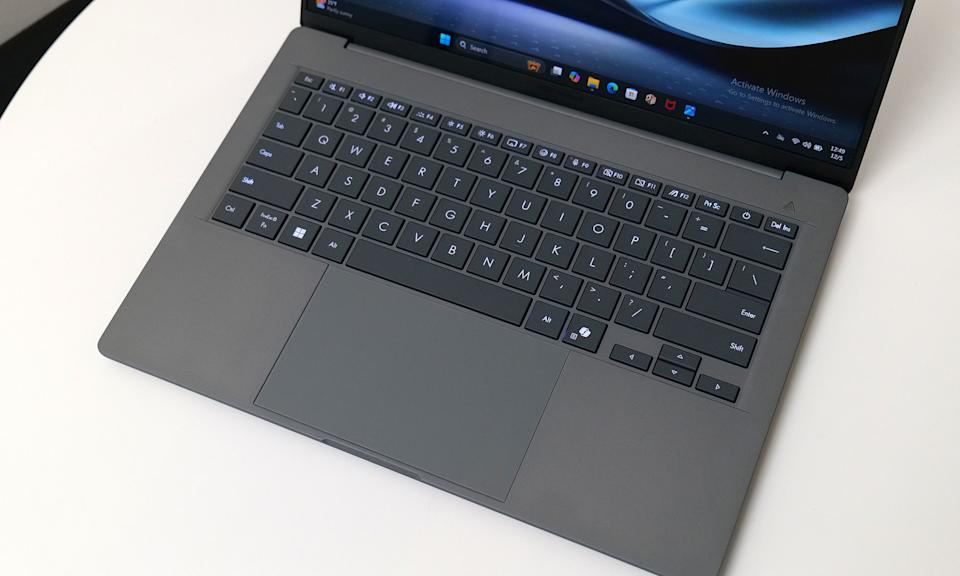
That 16:10 aspect ratio adds roughly 10% more vertical real estate compared to standard 16:9 panels. In practical terms: more document visible in Google Docs or Figma without scrolling. For anyone spending eight-hour days in productivity apps or design tools, it's a meaningful usability gain that compounds throughout a workweek.

What we couldn't test during three hours: color accuracy for print work requiring calibration tools, real-world brightness outdoors in direct Texas summer sunlight, or OLED burn-in risk for users keeping static UI elements on-screen for hours daily. These gaps matter for professionals doing color-critical work. Independent testing shows OLED displays reduce battery life compared to LCD variants—Surface Pro with OLED achieved around 11 hours in standardized tests while LCD models hit 14–16-plus hours. ASUS's 32-hour battery claim likely assumes lower brightness than you'll use in typical work conditions, especially in bright Midwest offices or outdoor California cafés.

The Apps That Work—And the Ones That Don't

Between the lines: ASUS representatives mentioned app compatibility exactly once during the demo, in a single sentence. What they didn't say is which apps have issues, how much performance you lose through emulation, and whether your specific workflow will hit a wall on the first Monday morning after purchase.

The Snapdragon X Elite uses ARM architecture, the same approach Apple took with M1 chips. Windows on ARM has improved significantly—Microsoft's Prism emulation layer runs most x86 apps—but "most" isn't "all," and performance through emulation varies in ways that can derail your workday.

Adobe Creative Cloud: Photoshop, Lightroom, and Premiere Pro run natively with full performance. Illustrator and InDesign rely on emulation. Independent testing confirms Adobe Premiere Pro's x86 build is blocked from emulation on Windows-on-ARM devices—reviewers couldn't run the x86 version on Snapdragon X Elite laptops at all.

Development tools: VS Code runs natively, but some extensions and toolchains—especially legacy build systems—may require workarounds.

Docker Desktop offers an ARM-native version, but some container images require x86 emulation with noticeable performance penalties.

Emulation performance overhead: Native ARM64 apps show roughly 40% performance advantage over emulated x86 versions in independent lab tests. Blender native versus emulated showed significant differences in rendering times—turning five-minute renders into eight minutes at every project deadline.

Specialized software: CAD programs, scientific computing tools, and niche industry applications may not run at all. Cold-weather battery performance matters for Northeast winters—ASUS didn't test below 10°C (50°F), which leaves questions for Chicago commuters and Boston students working outdoors in January and February.

Peripheral drivers: Printers, scanners, and older USB devices may lack ARM-compatible drivers. Mainstream USB and Thunderbolt devices generally work, but specific accessories—particularly specialized hardware from smaller manufacturers—should be verified before purchase.

ASUS didn't provide benchmark data or real-world performance comparisons during our hands-on time. We couldn't test compilation times, video export speeds, or emulation overhead across common workflows. These gaps matter deeply. If you rely on specific software daily, verify ARM compatibility before buying. The portability is real. The app compatibility question kept me up the night after testing.

What 32 Hours of Battery Actually Means

ASUS advertises up to 32 hours of battery life without specifying test conditions—screen brightness, workload type, connectivity settings. We didn't test this during a three-hour demo, and the number needs context you can trust.

Independent testing provides that context. Dell XPS 13 with Snapdragon X Elite achieved 19 hours and 41 minutes in standardized web-surfing battery tests at 150 nits brightness. Snapdragon X Elite laptops consistently achieve 12–20 hours in independent lab tests, with typical range of 15–16 hours for standardized web-surf tests across multiple models. HP OmniBook X hit 16:22, Surface Laptop variants reached 14–15-plus hours.

The 32-hour claim likely reflects a best-case scenario: minimal screen brightness, offline mode, light productivity tasks. Useful for understanding maximum potential but not representative of how most people work—Wi-Fi connected at 50% brightness, juggling Slack notifications, Zoom calls, and browser tabs throughout a typical workday.

Heavy tasks drain significantly faster. Video editing, compiling code, running virtual machines—expect 6–10 hours depending on workload intensity. Battery capacity varies significantly across Snapdragon X Elite laptops, ranging from 53 Wh to 66 Wh, affecting absolute runtime independently of chip efficiency. What to watch: independent reviews with controlled battery tests under typical use cases you can compare directly across competing laptops.

Typing, Touching, Using It Like You Actually Would

Saturday morning, final demo session. We typed several paragraphs of notes directly on the Zenbook A14. The keys felt stable with 1.3mm of travel—shallow by ThinkPad standards but comparable to most modern ultraportables. By paragraph three, finger fatigue hadn't set in. The sound was quiet, a soft tap-tap-tap that wouldn't disrupt a coffee shop or open office. Key action was crisp enough for extended typing without mushiness or the harsh bottoming-out feeling that creates hand strain after two-hour writing sessions.
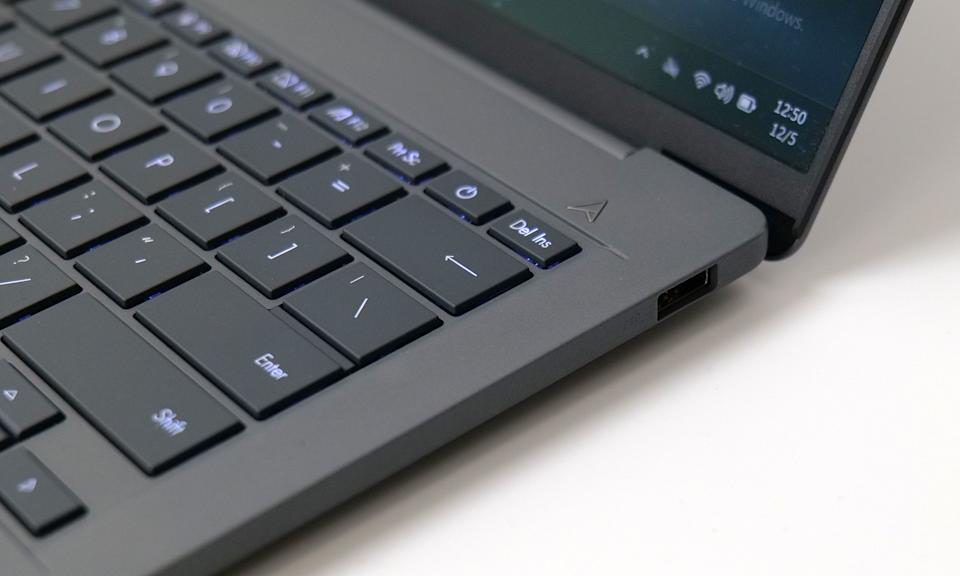
The trackpad responded accurately to multi-finger gestures during testing—two-finger scrolling felt smooth, three-finger app switching worked instantly, pinch-to-zoom tracked precisely. Surface texture felt smooth without being slippery, providing just enough friction for control. Click mechanism provided tactile feedback without excessive noise that would annoy video call participants.

What we couldn't evaluate: keyboard comfort over eight-hour typing marathons where fatigue compounds, trackpad precision for detailed Photoshop work requiring pixel-level cursor control, or long-term durability of key mechanisms under daily use across months. These require extended real-world testing, not a brief show-floor demo.

The 1080p IR camera supports Windows Hello facial recognition, which worked instantly during our testing—faster and more reliable than typing passwords, even under the harsh overhead lighting of the CES show floor. Speakers with Dolby Atmos support produced clear dialogue during a demo video, with better spatial separation than most laptop speakers. Bass response was minimal—expected given the thin chassis—but midrange clarity was solid for video calls and casual media consumption. Serious audio work or music enjoyment will still require headphones or external speakers.

MacBook Air vs. This: What You Trade and What You Gain

MacBook Air 13-inch (M2, 2024): $1,199 for 16GB RAM and 256GB storage. Heavier at 1.22 kg (2.7 pounds), fewer ports—just two USB-C ports and a headphone jack, period—but unmatched software ecosystem maturity and proven ARM compatibility. Battery life comparable under light use. Better choice if you're already in the Apple ecosystem or need guaranteed app compatibility without researching individual tools.

Dell XPS 13 (Intel, 2024): $1,299 for comparable specs. Weighs 1.18 kg (2.6 pounds) with traditional x86 compatibility that runs everything, but shorter battery life—typically 8–12 hours mixed use—and no OLED at this price point. Better choice if you need full Windows app compatibility without ARM concerns or compatibility research.

Lenovo ThinkPad X1 Carbon Gen 12: $1,399 for similar configuration. Weighs 1.12 kg (2.47 pounds) with legendary keyboard comfort, extensive port selection, Intel chip for universal compatibility. Heavier, more expensive, but unmatched durability track record and enterprise IT support that matters for corporate environments.

The Zenbook A14 undercuts all three on weight and price while delivering an OLED screen none of them offer at this tier. The trade-off is ARM compatibility risk—that nagging question of whether your critical app will run—and unproven long-term durability compared to established competitors with years of field data.
Who Should Buy This, Who Should Wait

Buy the $1,100 Zenbook A14 if: You prioritize portability above everything—daily subway commutes in New York, frequent cross-country flights, working from coffee shops—and every ounce matters in your bag or on your shoulder throughout long days. Your workflow centers on web apps, Microsoft 365, Figma, Slack, Zoom, and other mainstream productivity tools that run natively on ARM. You value OLED display quality for design work, photo editing, or media consumption without paying MacBook Pro prices. You need built-in HDMI and USB-A for presentations and legacy peripherals without carrying dongles. Battery life beyond a full workday matters more than maximum performance for intensive rendering or compilation tasks.

Skip the Zenbook A14 if: You rely on specialized software—CAD, scientific computing, niche industry tools—that may not support Windows on ARM architecture. Your development workflow depends on Docker, virtual machines, or toolchains with unverified ARM compatibility that could cost hours of troubleshooting. You need a proven keyboard for eight-plus hour typing days—ThinkPad or MacBook Pro keyboards offer better long-term comfort based on years of user feedback. You can wait six to twelve months for the ARM app ecosystem to mature further and for independent long-term durability data to emerge from early adopters. You require touchscreen or stylus support for design or note-taking workflows—the Zenbook A14 offers neither.

Consider the $900 base model if: You want the port selection and OLED screen but can accept slightly heavier weight at 1.09 kg (2.4 pounds) and less RAM. The performance difference between Snapdragon X Plus and X Elite matters mainly for video editing, 3D rendering, and heavy multitasking with dozens of browser tabs—casual productivity users working primarily in documents and web apps won't notice meaningful differences.

What to Watch Before You Spend

Independent reviews with full compatibility testing across common software categories—development tools, Adobe Creative Cloud, Microsoft 365, collaboration apps, and peripheral support. The ARM transition on Windows is real and improving monthly, but the specific apps you use daily need verification from reviewers who've tested your exact workflow.

Real-world battery testing under controlled conditions: 50% brightness, Wi-Fi connected, typical productivity workload mixing documents, video calls, and web browsing. The 32-hour claim needs context you can compare directly across competing laptops to make informed decisions.

Long-term durability reports from early adopters throughout spring and summer 2025—keyboard key wear, hinge stability after hundreds of open-close cycles, Ceraluminum finish durability, thermal performance under sustained load in warm climates. ASUS's build quality has improved in recent years, but ultralight laptops often sacrifice longevity for portability in ways that only emerge after months of daily use.

Software ecosystem maturation throughout 2025. Microsoft and Qualcomm are investing heavily in ARM Windows, and app compatibility will improve month by month as developers optimize and release native ARM builds. If your critical apps aren't ready now, they may be by mid-year when this laptop hits wider availability.

What will it feel like the first time you pull this laptop out with one hand while holding your coffee in the other, realize you haven't thought about weight once all day, and wonder if you can ever go back to carrying 1.4 kg again?

What is this about?

  • Review */
  • Logan Price/
  • Tech/
  • Gadgets
  • ASUS Zenbook A14/
  • Snapdragon processor/
  • battery technology/
  • display technology/
  • Windows on ARM/
  • ultraportable laptops

Feed

    Button AI Assistant Debuts, Offering Screen‑Free Voice Help

    Button AI Assistant Debuts, Offering Screen‑Free Voice Help

    Nostalgic iPod Shuffle design meets privacy‑first press‑to‑talk AI

    about 9 hours ago
    Razer Hammerhead V3 HyperSpeed Debuts with Dual‑Mode Case

    Razer Hammerhead V3 HyperSpeed Debuts with Dual‑Mode Case

    The USB‑C case also serves as a 2.4 GHz receiver, cutting dongles for PS5 and phones

    about 9 hours ago
    Apple ships 6.2 million Macs Q1 2026, M5‑MacBook Pro leads

    Apple ships 6.2 million Macs Q1 2026, M5‑MacBook Pro leads

    Apple’s share rises to 9.5%, moving it into fourth place among global PC makers

    about 9 hours ago
    Galaxy S22 Ultra can be bricked after factory reset

    Galaxy S22 Ultra can be bricked after factory reset

    US owners report IMEI‑level lock that hands control to unknown administrator Numero LLC

    about 9 hours ago
    Mouse: P.I. for Hire arrives April 16 on PC, PS5, and Xbox

    Mouse: P.I. for Hire arrives April 16 on PC, PS5, and Xbox

    Modes: 4K 60 fps quality or 120 fps performance on PS5 and Xbox Series X

    about 9 hours ago
    YouTube Rolls Out Auto Speed for Premium Users

    YouTube Rolls Out Auto Speed for Premium Users

    The AI‑driven playback boost aims to cut dead air on long videos

    1 day ago
    Blackwell Set to Capture Majority of the 2026 GPU Market

    Blackwell Set to Capture Majority of the 2026 GPU Market

    GB300/B300 GPUs Push Blackwell to 71% of Shipments; Rubin Falls to 22%

    1 day ago
    Google launches AI avatar tool for Shorts on April 9, 2026

    Google launches AI avatar tool for Shorts on April 9, 2026

    Ages 18+ can create digital replicas, with Synth ID tags and a 3‑year auto‑delete

    1 day ago
    Mac OS X 10.0 Cheetah runs on Wii

    Mac OS X 10.0 Cheetah runs on Wii

    Ports Mac OS X 10.0 Cheetah to the Wii, showing the PowerPC 750CL can run an OS

    1 day ago
    DuoBell Beats ANC: Safer Cycling with Apple AirPods Max

    DuoBell Beats ANC: Safer Cycling with Apple AirPods Max

    A 750 Hz blind‑spot lets DuoBell cut through ANC on popular headphones

    1 day ago
    Škoda DuoBell prototype unveiled on April 5, 2026

    Škoda DuoBell prototype unveiled on April 5, 2026

    750 Hz pulse and 2,000 Hz chime cut through ANC, alerting riders faster at 15 mph

    1 day ago
    SteamGPT Leak Reveals Dual‑Role AI on Steam

    SteamGPT Leak Reveals Dual‑Role AI on Steam

    Leak shows AI handling support and cheat‑detection for millions on the platform

    1 day ago
    Oppo Pad mini challenges Apple with Snapdragon 8 Gen 5

    Oppo Pad mini challenges Apple with Snapdragon 8 Gen 5

    April 21: Oppo Pad mini 8.8‑inch, Snapdragon 8 Gen 5, 5.39 mm, 279 g, 144 Hz OLED

    1 day ago
    Apple to ship 3 million foldable iPhones by end‑2026

    Apple to ship 3 million foldable iPhones by end‑2026

    Limited rollout equals 12 % of iPhone volume and rivals Samsung’s 2.4 million Galaxy Z Fold 7 sales

    1 day ago
    Apple unveils iPhone 18 Pro, iPhone 18 Pro Max, and iPhone Ultra

    Apple unveils iPhone 18 Pro, iPhone 18 Pro Max, and iPhone Ultra

    Mockups match leaked renders; 20 million Samsung panels for iPhone Ultra

    2 days ago
    Sony launches Playerbase program for Gran Turismo 7

    Sony launches Playerbase program for Gran Turismo 7

    PlayStation gamers can win a flight, facial scan, and an avatar in Gran Turismo 7

    2 days ago
    Claude Mythos Preview Beats Opus 4.6 in Cybersecurity!

    Claude Mythos Preview Beats Opus 4.6 in Cybersecurity!

    Claude Mythos Preview for five partners—pricing after a 100 million token credit

    2 days ago
    ChatGPT and AI Tools Let Solo Founders Launch Fast

    ChatGPT and AI Tools Let Solo Founders Launch Fast

    With GitHub Copilot, a founder can code, design, and deliver an MVP in days

    3 days ago
    Android 17 beta adds Notification Rules

    Android 17 beta adds Notification Rules

    New rules let users silence, block, or highlight alerts; Samsung eyes One UI 9

    3 days ago
    Utah Starts 12‑Month AI Chatbot Pilot for Psychiatric Meds

    Utah Starts 12‑Month AI Chatbot Pilot for Psychiatric Meds

    Legion Health pilot offers refills for 15 meds, easing shortages in rural Utah

    3 days ago
    Loading...
Tech/Gadgets

ASUS Zenbook A14 Review: 2.18 Pounds That Change Everything

Snapdragon X Elite, 32GB RAM, OLED—and the ARM compatibility question no one's answering

January 3, 2026, 4:21 pm

Three hours with the lightest Windows laptop you can buy. The $1,100 Zenbook A14 delivers OLED brilliance, full ports, and all-day battery in a 2.18-pound chassis. But Windows on ARM means app compatibility risks ASUS barely mentioned. We tested the keyboard, tracked the battery claims, and asked the hard questions about who should buy it now—and who should wait.

image-154

Three hours at CES 2025, and I kept coming back to one thing: lifting this laptop felt wrong. Too light. Like holding a magazine instead of a computer that costs $1,100 and packs 32GB of RAM. An ASUS product manager demonstrated by threading thumb and index finger through the chassis gap—holding the entire Zenbook A14 suspended for thirty seconds without strain. At 0.99 kg (2.18 pounds), it's the lightest 14-inch Windows laptop you can buy right now, and that changes the math on what "portable" actually means.

We tested the Snapdragon X Elite configuration—32GB RAM, 14-inch OLED display, Ceraluminum chassis—during a Tuesday morning demo session. The $900 base model with Snapdragon X Plus and slightly heavier frame waits for its own evaluation once we can test it properly beyond a show floor. This is about the premium configuration, the one that ships to all 50 states via ASUS store and Best Buy starting March 2025, and whether its portability and display justify the ARM compatibility trade-offs for your specific workflow.

What Works, What Doesn't, Who It's For

The Zenbook A14 excels at disappearing in your bag while delivering an OLED screen that outshines most laptops twice its price. It includes the ports—HDMI, USB-A, dual USB-C—that match how you actually work instead of forcing dongles into your daily routine. At $1,100, it undercuts MacBook Air by $99 and includes ports Apple makes you buy separately for $80-plus in adapters.

The biggest limitation arrives with Windows on ARM architecture. Some software won't run at all. Some runs slower through emulation. ASUS mentioned this once during the demo—"most popular apps work"—without specifying which ones don't or how much performance you lose. That vagueness matters when your paycheck depends on specific tools running reliably.

This laptop fits professionals whose workflows center on web apps, Microsoft 365, Slack, Zoom, and other mainstream tools that run natively on ARM. It's built for anyone prioritizing portability for daily commutes—think TSA checkpoints at O'Hare or coffee shops in Austin—over maximum compatibility with specialized software. If you're a UX designer working primarily in Figma and Google Suite, this could be your next machine. If you're a developer relying on legacy Docker configurations or industry-specific CAD software, verify ARM compatibility before spending a dollar.

The First Time You Pull It Out One-Handed While Holding Coffee

MacBook Air 13-inch: 1.22 kg (2.7 pounds). Most 14-inch Windows laptops: 1.27 to 1.45 kg (2.8 to 3.2 pounds). The Zenbook A14 undercuts them all at 0.99 kg (2.18 pounds)—enough to feel immediately different the first time you swing your bag onto your shoulder for a day of back-to-back meetings across Manhattan or a cross-country flight from Seattle to Miami.

ASUS used Snapdragon's power efficiency to strip away the thermal mass Intel chips demand, then wrapped everything in Ceraluminum—a ceramic-aluminum composite that's lighter and more rigid than standard aluminum. The surface feels slightly warmer to the touch than bare metal, almost like touching smooth stone that's been sitting in mild sunlight. Less heat-sinking means it stays comfortable when the laptop rests on your lap during long work sessions in airport lounges.

Thursday afternoon, same demo area at CES. A photographer from Portland plugged an SD card reader into the USB-A port, connected an external monitor via HDMI, charged through USB-C—all simultaneously, no adapters cluttering the table. The look on his face said everything about why built-in ports matter when you're working client sites and conference rooms where you can't afford fumbling for the right dongle while everyone waits.

The Colors That Make You Stop Mid-Scroll

The 14-inch OLED panel delivers 2880 × 1800 resolution at 243 PPI with 16:10 aspect ratio. ASUS claims 100% DCI-P3 color gamut and 400 nits peak brightness. We didn't have a colorimeter on the show floor, but side-by-side against a MacBook Air's LCD, the difference stopped conversations—deeper blacks, richer saturation, better contrast viewing design mockups and video. Colors felt more alive, like the difference between looking at a photograph in a magazine versus seeing the original print.

That 16:10 aspect ratio adds roughly 10% more vertical real estate compared to standard 16:9 panels. In practical terms: more document visible in Google Docs or Figma without scrolling. For anyone spending eight-hour days in productivity apps or design tools, it's a meaningful usability gain that compounds throughout a workweek.

What we couldn't test during three hours: color accuracy for print work requiring calibration tools, real-world brightness outdoors in direct Texas summer sunlight, or OLED burn-in risk for users keeping static UI elements on-screen for hours daily. These gaps matter for professionals doing color-critical work. Independent testing shows OLED displays reduce battery life compared to LCD variants—Surface Pro with OLED achieved around 11 hours in standardized tests while LCD models hit 14–16-plus hours. ASUS's 32-hour battery claim likely assumes lower brightness than you'll use in typical work conditions, especially in bright Midwest offices or outdoor California cafés.

The Apps That Work—And the Ones That Don't

Between the lines: ASUS representatives mentioned app compatibility exactly once during the demo, in a single sentence. What they didn't say is which apps have issues, how much performance you lose through emulation, and whether your specific workflow will hit a wall on the first Monday morning after purchase.

The Snapdragon X Elite uses ARM architecture, the same approach Apple took with M1 chips. Windows on ARM has improved significantly—Microsoft's Prism emulation layer runs most x86 apps—but "most" isn't "all," and performance through emulation varies in ways that can derail your workday.

Adobe Creative Cloud: Photoshop, Lightroom, and Premiere Pro run natively with full performance. Illustrator and InDesign rely on emulation. Independent testing confirms Adobe Premiere Pro's x86 build is blocked from emulation on Windows-on-ARM devices—reviewers couldn't run the x86 version on Snapdragon X Elite laptops at all.

Development tools: VS Code runs natively, but some extensions and toolchains—especially legacy build systems—may require workarounds.

Docker Desktop offers an ARM-native version, but some container images require x86 emulation with noticeable performance penalties.

Emulation performance overhead: Native ARM64 apps show roughly 40% performance advantage over emulated x86 versions in independent lab tests. Blender native versus emulated showed significant differences in rendering times—turning five-minute renders into eight minutes at every project deadline.

Specialized software: CAD programs, scientific computing tools, and niche industry applications may not run at all. Cold-weather battery performance matters for Northeast winters—ASUS didn't test below 10°C (50°F), which leaves questions for Chicago commuters and Boston students working outdoors in January and February.

Peripheral drivers: Printers, scanners, and older USB devices may lack ARM-compatible drivers. Mainstream USB and Thunderbolt devices generally work, but specific accessories—particularly specialized hardware from smaller manufacturers—should be verified before purchase.

ASUS didn't provide benchmark data or real-world performance comparisons during our hands-on time. We couldn't test compilation times, video export speeds, or emulation overhead across common workflows. These gaps matter deeply. If you rely on specific software daily, verify ARM compatibility before buying. The portability is real. The app compatibility question kept me up the night after testing.

What 32 Hours of Battery Actually Means

ASUS advertises up to 32 hours of battery life without specifying test conditions—screen brightness, workload type, connectivity settings. We didn't test this during a three-hour demo, and the number needs context you can trust.

Independent testing provides that context. Dell XPS 13 with Snapdragon X Elite achieved 19 hours and 41 minutes in standardized web-surfing battery tests at 150 nits brightness. Snapdragon X Elite laptops consistently achieve 12–20 hours in independent lab tests, with typical range of 15–16 hours for standardized web-surf tests across multiple models. HP OmniBook X hit 16:22, Surface Laptop variants reached 14–15-plus hours.

The 32-hour claim likely reflects a best-case scenario: minimal screen brightness, offline mode, light productivity tasks. Useful for understanding maximum potential but not representative of how most people work—Wi-Fi connected at 50% brightness, juggling Slack notifications, Zoom calls, and browser tabs throughout a typical workday.

Heavy tasks drain significantly faster. Video editing, compiling code, running virtual machines—expect 6–10 hours depending on workload intensity. Battery capacity varies significantly across Snapdragon X Elite laptops, ranging from 53 Wh to 66 Wh, affecting absolute runtime independently of chip efficiency. What to watch: independent reviews with controlled battery tests under typical use cases you can compare directly across competing laptops.

Typing, Touching, Using It Like You Actually Would

Saturday morning, final demo session. We typed several paragraphs of notes directly on the Zenbook A14. The keys felt stable with 1.3mm of travel—shallow by ThinkPad standards but comparable to most modern ultraportables. By paragraph three, finger fatigue hadn't set in. The sound was quiet, a soft tap-tap-tap that wouldn't disrupt a coffee shop or open office. Key action was crisp enough for extended typing without mushiness or the harsh bottoming-out feeling that creates hand strain after two-hour writing sessions.

The trackpad responded accurately to multi-finger gestures during testing—two-finger scrolling felt smooth, three-finger app switching worked instantly, pinch-to-zoom tracked precisely. Surface texture felt smooth without being slippery, providing just enough friction for control. Click mechanism provided tactile feedback without excessive noise that would annoy video call participants.

What we couldn't evaluate: keyboard comfort over eight-hour typing marathons where fatigue compounds, trackpad precision for detailed Photoshop work requiring pixel-level cursor control, or long-term durability of key mechanisms under daily use across months. These require extended real-world testing, not a brief show-floor demo.

The 1080p IR camera supports Windows Hello facial recognition, which worked instantly during our testing—faster and more reliable than typing passwords, even under the harsh overhead lighting of the CES show floor. Speakers with Dolby Atmos support produced clear dialogue during a demo video, with better spatial separation than most laptop speakers. Bass response was minimal—expected given the thin chassis—but midrange clarity was solid for video calls and casual media consumption. Serious audio work or music enjoyment will still require headphones or external speakers.

MacBook Air vs. This: What You Trade and What You Gain

MacBook Air 13-inch (M2, 2024): $1,199 for 16GB RAM and 256GB storage. Heavier at 1.22 kg (2.7 pounds), fewer ports—just two USB-C ports and a headphone jack, period—but unmatched software ecosystem maturity and proven ARM compatibility. Battery life comparable under light use. Better choice if you're already in the Apple ecosystem or need guaranteed app compatibility without researching individual tools.

Dell XPS 13 (Intel, 2024): $1,299 for comparable specs. Weighs 1.18 kg (2.6 pounds) with traditional x86 compatibility that runs everything, but shorter battery life—typically 8–12 hours mixed use—and no OLED at this price point. Better choice if you need full Windows app compatibility without ARM concerns or compatibility research.

Lenovo ThinkPad X1 Carbon Gen 12: $1,399 for similar configuration. Weighs 1.12 kg (2.47 pounds) with legendary keyboard comfort, extensive port selection, Intel chip for universal compatibility. Heavier, more expensive, but unmatched durability track record and enterprise IT support that matters for corporate environments.

The Zenbook A14 undercuts all three on weight and price while delivering an OLED screen none of them offer at this tier. The trade-off is ARM compatibility risk—that nagging question of whether your critical app will run—and unproven long-term durability compared to established competitors with years of field data.

Who Should Buy This, Who Should Wait

Buy the $1,100 Zenbook A14 if: You prioritize portability above everything—daily subway commutes in New York, frequent cross-country flights, working from coffee shops—and every ounce matters in your bag or on your shoulder throughout long days. Your workflow centers on web apps, Microsoft 365, Figma, Slack, Zoom, and other mainstream productivity tools that run natively on ARM. You value OLED display quality for design work, photo editing, or media consumption without paying MacBook Pro prices. You need built-in HDMI and USB-A for presentations and legacy peripherals without carrying dongles. Battery life beyond a full workday matters more than maximum performance for intensive rendering or compilation tasks.

Skip the Zenbook A14 if: You rely on specialized software—CAD, scientific computing, niche industry tools—that may not support Windows on ARM architecture. Your development workflow depends on Docker, virtual machines, or toolchains with unverified ARM compatibility that could cost hours of troubleshooting. You need a proven keyboard for eight-plus hour typing days—ThinkPad or MacBook Pro keyboards offer better long-term comfort based on years of user feedback. You can wait six to twelve months for the ARM app ecosystem to mature further and for independent long-term durability data to emerge from early adopters. You require touchscreen or stylus support for design or note-taking workflows—the Zenbook A14 offers neither.

Consider the $900 base model if: You want the port selection and OLED screen but can accept slightly heavier weight at 1.09 kg (2.4 pounds) and less RAM. The performance difference between Snapdragon X Plus and X Elite matters mainly for video editing, 3D rendering, and heavy multitasking with dozens of browser tabs—casual productivity users working primarily in documents and web apps won't notice meaningful differences.

What to Watch Before You Spend

Independent reviews with full compatibility testing across common software categories—development tools, Adobe Creative Cloud, Microsoft 365, collaboration apps, and peripheral support. The ARM transition on Windows is real and improving monthly, but the specific apps you use daily need verification from reviewers who've tested your exact workflow.

Real-world battery testing under controlled conditions: 50% brightness, Wi-Fi connected, typical productivity workload mixing documents, video calls, and web browsing. The 32-hour claim needs context you can compare directly across competing laptops to make informed decisions.

Long-term durability reports from early adopters throughout spring and summer 2025—keyboard key wear, hinge stability after hundreds of open-close cycles, Ceraluminum finish durability, thermal performance under sustained load in warm climates. ASUS's build quality has improved in recent years, but ultralight laptops often sacrifice longevity for portability in ways that only emerge after months of daily use.

Software ecosystem maturation throughout 2025. Microsoft and Qualcomm are investing heavily in ARM Windows, and app compatibility will improve month by month as developers optimize and release native ARM builds. If your critical apps aren't ready now, they may be by mid-year when this laptop hits wider availability.

What will it feel like the first time you pull this laptop out with one hand while holding your coffee in the other, realize you haven't thought about weight once all day, and wonder if you can ever go back to carrying 1.4 kg again?
What is this about?

  • Review */
  • Logan Price/
  • Tech/
  • Gadgets
  • ASUS Zenbook A14/
  • Snapdragon processor/
  • battery technology/
  • display technology/
  • Windows on ARM/
  • ultraportable laptops

Feed

    Button AI Assistant Debuts, Offering Screen‑Free Voice Help

    Button AI Assistant Debuts, Offering Screen‑Free Voice Help

    Nostalgic iPod Shuffle design meets privacy‑first press‑to‑talk AI

    about 9 hours ago
    Razer Hammerhead V3 HyperSpeed Debuts with Dual‑Mode Case

    Razer Hammerhead V3 HyperSpeed Debuts with Dual‑Mode Case

    The USB‑C case also serves as a 2.4 GHz receiver, cutting dongles for PS5 and phones

    about 9 hours ago
    Apple ships 6.2 million Macs Q1 2026, M5‑MacBook Pro leads

    Apple ships 6.2 million Macs Q1 2026, M5‑MacBook Pro leads

    Apple’s share rises to 9.5%, moving it into fourth place among global PC makers

    about 9 hours ago
    Galaxy S22 Ultra can be bricked after factory reset

    Galaxy S22 Ultra can be bricked after factory reset

    US owners report IMEI‑level lock that hands control to unknown administrator Numero LLC

    about 9 hours ago
    Mouse: P.I. for Hire arrives April 16 on PC, PS5, and Xbox

    Mouse: P.I. for Hire arrives April 16 on PC, PS5, and Xbox

    Modes: 4K 60 fps quality or 120 fps performance on PS5 and Xbox Series X

    about 9 hours ago
    YouTube Rolls Out Auto Speed for Premium Users

    YouTube Rolls Out Auto Speed for Premium Users

    The AI‑driven playback boost aims to cut dead air on long videos

    1 day ago
    Blackwell Set to Capture Majority of the 2026 GPU Market

    Blackwell Set to Capture Majority of the 2026 GPU Market

    GB300/B300 GPUs Push Blackwell to 71% of Shipments; Rubin Falls to 22%

    1 day ago
    Google launches AI avatar tool for Shorts on April 9, 2026

    Google launches AI avatar tool for Shorts on April 9, 2026

    Ages 18+ can create digital replicas, with Synth ID tags and a 3‑year auto‑delete

    1 day ago
    Mac OS X 10.0 Cheetah runs on Wii

    Mac OS X 10.0 Cheetah runs on Wii

    Ports Mac OS X 10.0 Cheetah to the Wii, showing the PowerPC 750CL can run an OS

    1 day ago
    DuoBell Beats ANC: Safer Cycling with Apple AirPods Max

    DuoBell Beats ANC: Safer Cycling with Apple AirPods Max

    A 750 Hz blind‑spot lets DuoBell cut through ANC on popular headphones

    1 day ago
    Škoda DuoBell prototype unveiled on April 5, 2026

    Škoda DuoBell prototype unveiled on April 5, 2026

    750 Hz pulse and 2,000 Hz chime cut through ANC, alerting riders faster at 15 mph

    1 day ago
    SteamGPT Leak Reveals Dual‑Role AI on Steam

    SteamGPT Leak Reveals Dual‑Role AI on Steam

    Leak shows AI handling support and cheat‑detection for millions on the platform

    1 day ago
    Oppo Pad mini challenges Apple with Snapdragon 8 Gen 5

    Oppo Pad mini challenges Apple with Snapdragon 8 Gen 5

    April 21: Oppo Pad mini 8.8‑inch, Snapdragon 8 Gen 5, 5.39 mm, 279 g, 144 Hz OLED

    1 day ago
    Apple to ship 3 million foldable iPhones by end‑2026

    Apple to ship 3 million foldable iPhones by end‑2026

    Limited rollout equals 12 % of iPhone volume and rivals Samsung’s 2.4 million Galaxy Z Fold 7 sales

    1 day ago
    Apple unveils iPhone 18 Pro, iPhone 18 Pro Max, and iPhone Ultra

    Apple unveils iPhone 18 Pro, iPhone 18 Pro Max, and iPhone Ultra

    Mockups match leaked renders; 20 million Samsung panels for iPhone Ultra

    2 days ago
    Sony launches Playerbase program for Gran Turismo 7

    Sony launches Playerbase program for Gran Turismo 7

    PlayStation gamers can win a flight, facial scan, and an avatar in Gran Turismo 7

    2 days ago
    Claude Mythos Preview Beats Opus 4.6 in Cybersecurity!

    Claude Mythos Preview Beats Opus 4.6 in Cybersecurity!

    Claude Mythos Preview for five partners—pricing after a 100 million token credit

    2 days ago
    ChatGPT and AI Tools Let Solo Founders Launch Fast

    ChatGPT and AI Tools Let Solo Founders Launch Fast

    With GitHub Copilot, a founder can code, design, and deliver an MVP in days

    3 days ago
    Android 17 beta adds Notification Rules

    Android 17 beta adds Notification Rules

    New rules let users silence, block, or highlight alerts; Samsung eyes One UI 9

    3 days ago
    Utah Starts 12‑Month AI Chatbot Pilot for Psychiatric Meds

    Utah Starts 12‑Month AI Chatbot Pilot for Psychiatric Meds

    Legion Health pilot offers refills for 15 meds, easing shortages in rural Utah

    3 days ago
    Loading...
banner